




07-26-2026, 08:21 PM
Want to rotate your scanned PDF page? That will be $12.99! - Rip off of the century.
It's one of the applications that has been used most worldwide and on daily basis, but not allowing basic functionality or not having any alternatives was everyone's pain. Being hit with "Pro version" ad, or taking forever to open a single page, or glitching out because AI is initialising in the background.
By far the best alternative I found is Stirling PDF - https://stirling.com/
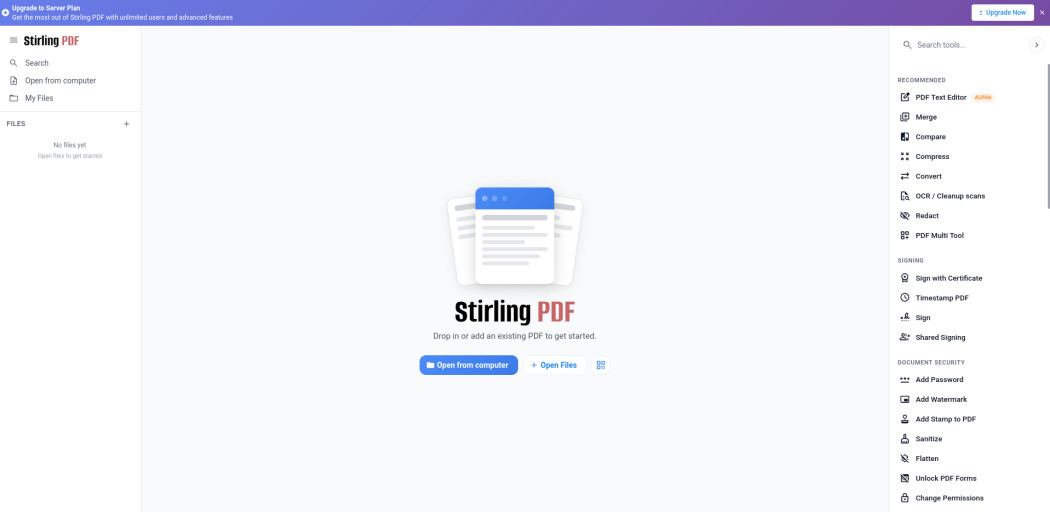
They do have "Pro" and "Enterprise" versions, but you get 60+ PDF tools for Free. On top of that it loads faster than Adobe PDF due to reduced bloat.
If you want an app for your phone - ReadEra. Although made for books, it loads PDFs on your phone without ads and very quickly, just like Stirling PDF.
I must also warn, Stirling PDF is not great on phones yet. When opening PDFs in non-standard size it takes long to open, and zoom doesn't work correctly as of date.
So these are great alternatives that I've been using that have absolutely no compromises, instead giving you tools that you haven't used yet if you never wanted to subscribe to $12.99 to be able to rotate a page twice a year.
It's one of the applications that has been used most worldwide and on daily basis, but not allowing basic functionality or not having any alternatives was everyone's pain. Being hit with "Pro version" ad, or taking forever to open a single page, or glitching out because AI is initialising in the background.
By far the best alternative I found is Stirling PDF - https://stirling.com/
They do have "Pro" and "Enterprise" versions, but you get 60+ PDF tools for Free. On top of that it loads faster than Adobe PDF due to reduced bloat.
If you want an app for your phone - ReadEra. Although made for books, it loads PDFs on your phone without ads and very quickly, just like Stirling PDF.
I must also warn, Stirling PDF is not great on phones yet. When opening PDFs in non-standard size it takes long to open, and zoom doesn't work correctly as of date.
So these are great alternatives that I've been using that have absolutely no compromises, instead giving you tools that you haven't used yet if you never wanted to subscribe to $12.99 to be able to rotate a page twice a year.
---
Ask, and it shall be given you; seek, and ye shall find; knock, and it shall be opened unto you.
Ask, and it shall be given you; seek, and ye shall find; knock, and it shall be opened unto you.